Why divyap
Built around the shape of the event, not around a checklist
Most families plan a big wedding with a spreadsheet, five group texts and a lot of phone calls. The tools that try to replace that were mostly built for a one-day wedding with one list. divyap starts from what these events actually are: several events, two families, many helpers, and a dozen vendors who all need the same decisions.
Swipe the table to compare the other ways of planning →
| What a multi-part event needs | divyap | Spreadsheets & group chats | Wedding checklist apps | General project tools |
|---|---|---|---|---|
| Several events under one nameEach part with its own tasks, budget, vendors, guests and look, rolling up into one | Yes | Partly, or by hand | No | Partly, or by hand |
| Tells you what is slippingLate, blocked and over-budget items brought to the top, with who to call | Yes | No | Partly, or by hand | Partly, or by hand |
| People see only their partA volunteer on the sangeet sees the sangeet; approvals stay with approvers | Yes | No | No | Partly, or by hand |
| Start from a descriptionParts, dated tasks, vendor needs and a budget split from a few sentences | Yes | No | Partly, or by hand | No |
| Design that reaches the vendorsA brief, pictures not colour codes, one signed-off direction per vendor | Yes | No | Partly, or by hand | No |
| Vendors as a pipelineSeveral vendors per need, quotes side by side, who went quiet | Yes | Partly, or by hand | Partly, or by hand | Partly, or by hand |
| Planned, committed and paidThree numbers on one scale, in your event's currency, across parts and categories | Yes | Partly, or by hand | Partly, or by hand | No |
| Many currencies, one totalEach amount kept in the currency it was agreed in, at a frozen rate, rolling up into one | Yes | Partly, or by hand | No | No |
| Families across countriesWho flies in when, who needs a pickup, vendors in different cities, the event in its own time zone | Yes | Partly, or by hand | Partly, or by hand | No |
| An assistant that can actTell it what happened; it proposes the changes, you approve them | Yes | No | No | Partly, or by hand |
| Multi-day weddings by defaultRehearsal dinner to farewell brunch — or mehndi to reception — is the starting point, not custom fields | Yes | Partly, or by hand | No | No |
built in · partly, or by hand · not really. These are categories, not products — some tools do more than their category, and this is how a typical one works out of the box.
The difference you can see: same wedding, different person
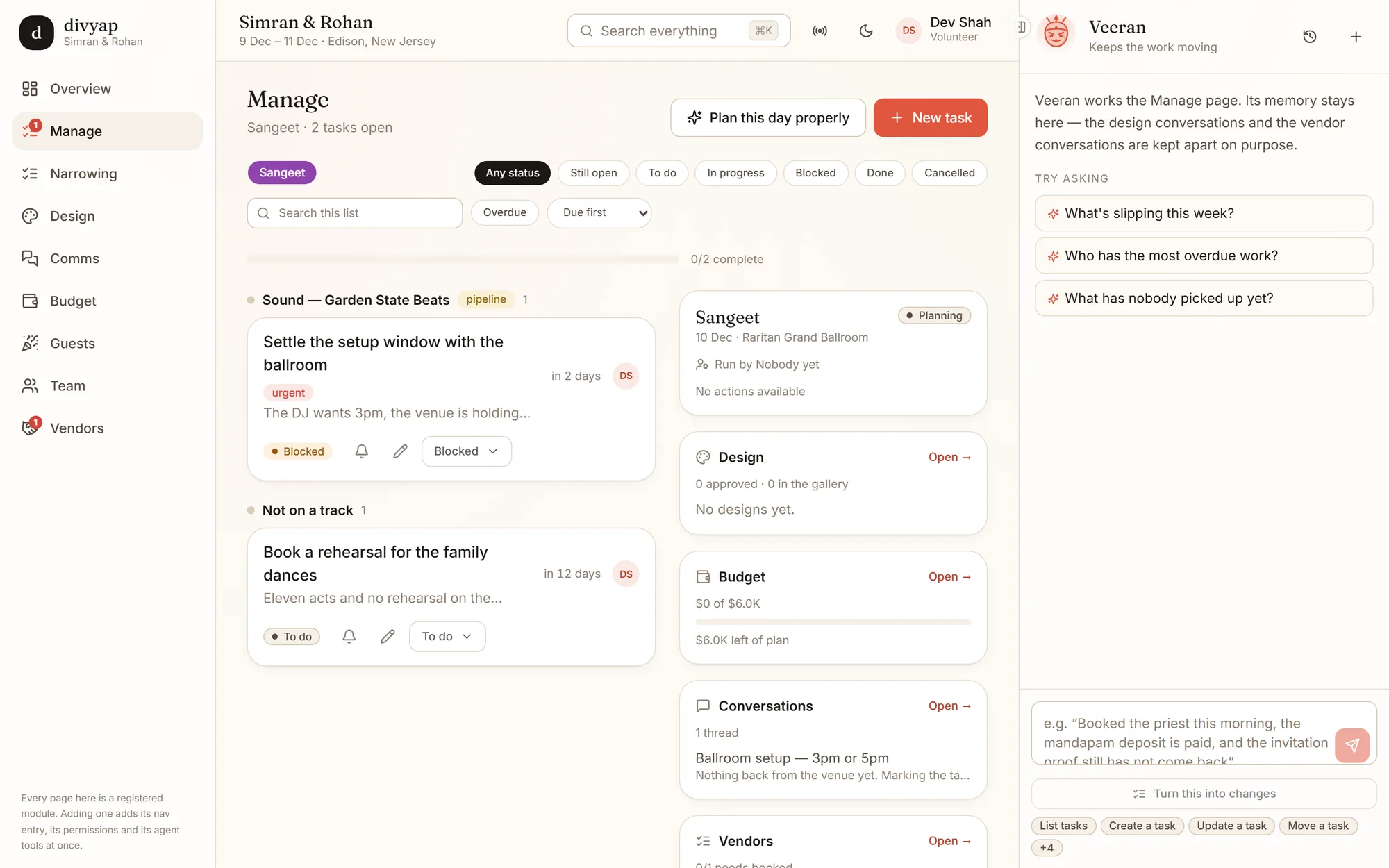
In a shared spreadsheet everybody sees everything, or you keep five copies. In divyap, what each person can do comes from what they were given on this event.Dev, a cousin at a New Jersey wedding, runs the sangeet, so his Manage page is the sangeet: two tasks, its budget, its vendor conversations — and nothing to approve that is not his.
His assistant works under exactly the same rules. That is the part most AI tools skip: an assistant that can act has to be limited to what its person may do.
Where the others are still better
divyap is young and in private alpha. If one of these matters most to you, it is worth knowing up front.
Spreadsheets & group chats
Free, already on everybody’s phone, and nobody needs an account. For a small, one-day event they are often enough.
Wedding checklist apps
Most come with a guest website and a gift registry, and some with a vendor directory for your city. divyap has RSVP pages and keeps track of gifts and thank-yous, but it is not a registry.
General project tools
Mature, fast and connected to everything else your company uses. If your team already lives in one, that matters.
divyap is in private alpha
Testers get an access code. If somebody gave you one, create your account and start your event — or look around three finished ones first.